











PS2 Steam Deck Tutorial

Greetings comrades, today’s post is a PS2 Steam Deck Tutorial. I will go through the installation and setup process for Playstation 2 emulation on the Steam Deck using PCSX2. I will include all of my settings which give a pleasant PS2 gaming experience on the Steam Deck. let’s get cracking…
Disclaimer. I am not condoning piracy you must legally own a PS2 console and the games you wish to play.
What you will need
You will need your own PS2 Bios files and a backup/iso copy of the games you wish to play.
PCSX2 Installation
Head into desktop mode on your Steam Deck and open the application launcher at the bottom left.
Click the application menu and search for the Discover store then search for PCSX2. This will find you the PCSX2 emulator.
Select Install at the top right and wait for it to fully install before proceeding to the next step.

Bios setup
Launch PCSX2 and you will be presented with a setup screen. Open the Dolphin file manager and select the hamburger icon in the top right. Scroll down and select show hidden files.
With the file manager still open select Home in the top left then click through the following folders in this order. .var/app/net.pcsx2.PCSX2/config/PCSX2/bios.
Drop your extracted bios files into the bios folder then you can close the file manager.

PCSX2 Configuration
Hit refresh list and your bios will show, you can double-click on the bios you want in the list to proceed.

Close the program log screen which is running behind the PCSX2 interface, this sometimes can cause problems so best to completely close it.
Create a new folder to store your games, I named my folder “Games” and placed this in Home .var/app/net.pcsx2.PCSX2/. You should put your game ISO files here.

In PCSX2 select System-Game Settings and enable widescreen patches.

Go to Config-General then choose GS Window in the bottom left then set the aspect ratio to fit-to window/screen.
Set the custom window size to 1280×800 and tick the box to start in fullscreen mode.

Select Speedhacks from the bottom left and tick the box for MTVU and click apply.
If you are presented with a popup saying configure folder does not exist you can select create. Click ok.

Go to config-graphics settings and for the renderer select Vulkan, for the adaptor select AMD RADV and for internal resolution select 2x Native 720.
Select CRC Hack Level and choose the aggressive option.

Now select Hacks and select Manual HW Hacks and tick Disable partial invalidation and hit ok.
You can now close PCSX2.

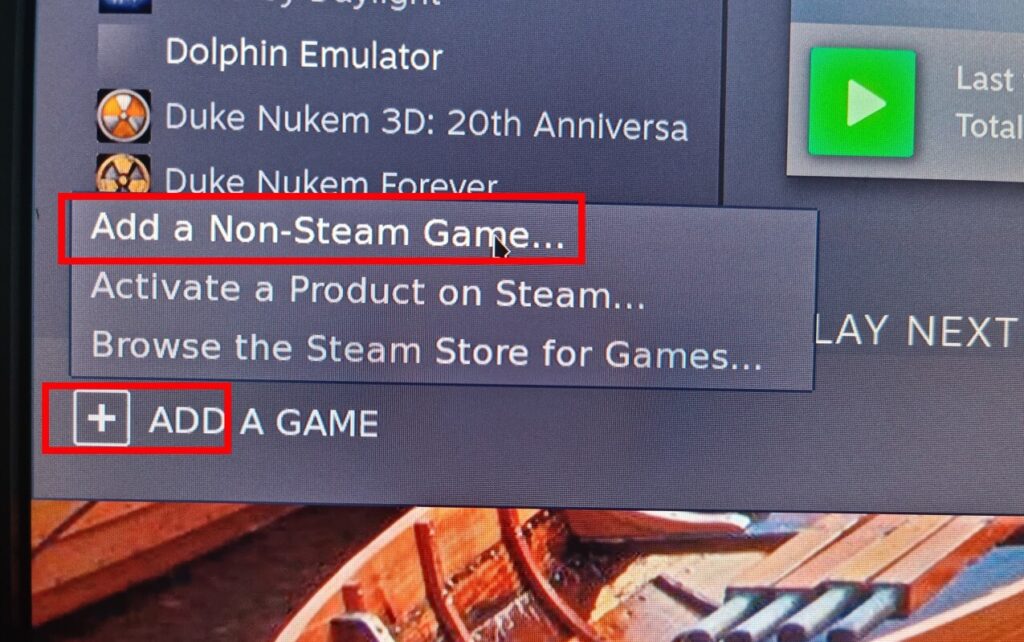
Open Steam while still in desktop mode and select Library – Add a game – Add non-Steam game and tick the box for PCSX2 then choose add selected program.
Now you can close out and return to gaming mode.

Configure the controller and Running Games
Select library and PCXS2 but do not launch it yet, select the controller icon on the right and choose the box below where it says current layout.


Go to community layouts top middle right and search down the list for phawx tweaked and press A to download it.
This is a controller layout profile all set up and ready to use in PCSX2.

At this stage, we are good to go back and hit Play to launch PCSX2 so do this, and then there is one final step to do.
To run games go to CDVD-Browse and then locate the folder you stored your game files in and select the game you want to run.
Select System-Boot ISO and your chosen game will now launch.


Congratulations you can now enjoy your favorite Playstation 2 games on your Steam Deck.
NOTE: If you want to exit games in gaming mode then simply hit the Steam button and close down the emulator from there.
If you would like to know how to install custom artwork for your games and emulators then see our post Custom Artwork on Steam Deck
Thanks for reading my PS2 Steam Deck Tutorial article. I hope you are now all set up with PS2 emulation and if you have any questions at all then please feel free to get in touch by leaving a comment or by reaching out to me on my socials. Until next time, stay cool.
Jamie E.